Goodreads alternatives with no account (private, offline, 2026)
Book trackers you can use without signing up. We compared Goodreads alternatives that need no account, keep your library private, and work offline in 2026.
Most people who search for a Goodreads alternative are not looking for a better social network. They want the opposite: a place to log books that doesn’t ask for an email, doesn’t show their reading to anyone, and still opens on a plane.
That turns out to be a short list. Plenty of book trackers are excellent, but most of them are online services first. You sign up, your shelves live on their servers, and the app is a window onto that account.
This guide only looks at the question that matters for this search: can you use it without an account, and does it work offline? We build Gleamry, the first app on the list, and we say so up front. We checked every other app against its own App Store listing, website, or help pages in October 2026, and we only state what we could confirm.
Quick answer
- Best overall for no account and offline use on iPhone: Gleamry. Local-first, no sign-up, fully usable offline, and it imports your Goodreads library.
- Best for cataloging a physical collection: BookBuddy. No account, library stored on your device.
- Best for reading timers: Bookly. No account on iOS.
- Best free option with a reading calendar: Bookmory. No sign-in to start, with ads in the free version.
- Most private of all: a spreadsheet or a paper notebook, if you can live without covers and stats.
The StoryGraph, Basmo, Libib, and Fable are good apps, but each one is built around an account. More on them below.
What “no account, private, offline” actually means
These words get stretched in app descriptions, so here is the bar we used:
- No account means you can install the app and log your first book without creating a login. Signing in with Apple, Google, or an email address counts as an account.
- Private means your library isn’t a public profile by default, and it isn’t stored on the developer’s servers unless you choose that.
- Offline means the day-to-day work (marking a book as finished, logging pages, browsing your shelf) works without a connection. Searching a book catalog always needs the internet, in every app on this list. That part is normal.
One trade-off to know before you choose: an app with no account usually has no cloud copy of your data either. That makes export and backup important. We mention for each app how you get your data out.
1. Gleamry: best overall
Gleamry is a local-first book tracker for iPhone. There is no account and no backend: your library, reading sessions, and goals are stored on your phone. The network is only used to look up book details and covers. Everything else works offline, including adding a book by hand, logging a session, checking your stats, and arranging your shelf.
What you get
- A bookshelf that looks like yours. Arrange covers and decorations on the shelf. Tap a book and it slides off the shelf into an interactive 3D object before opening its page.
- Three ways to add a book. Search online (Google Books and Open Library, merged into one list), scan a barcode, or type it in yourself, with your own cover photo. Manual entry needs no network at all.
- Habit tools. A yearly book goal, a daily page goal, a daily reminder, reading sessions, and a streak.
- Stats you will actually look at. A month calendar with the covers of what you read, a yearly goal with one bar per month, your longest streak, and your reading pace.
- Your data, your exit. Import from Goodreads, and export a JSON backup or a Goodreads-compatible CSV whenever you want.
- No tracking. The app ships no analytics or tracking SDKs.
Best for: readers who want a private tracker that works anywhere and is genuinely pleasant to open every day.
Keep in mind: Gleamry is iPhone-first, with no Android version at the moment. Because there is no account, there is also no sync between devices yet, so export a backup from Settings now and then. It has no social feed, by design. Gleamry is a paid app; current pricing is on the App Store.
2. BookBuddy: best for cataloging a home library
BookBuddy, from Kimico, has been around for years and is more of a library manager than a habit tracker. Its App Store listing states that your library is “saved locally and privately on your device,” and you don’t need a BookBuddy account to use it. If you want your books on more than one device, you can turn on iCloud or Dropbox sync.
It shines with physical collections: barcode scanning (including Bluetooth scanners), wish lists, books you’ve lent out, and categories and tags. It can import a CSV and export your library as CSV, PDF, or HTML. It also has reading stats such as books finished and pages read.
Best for: collectors and anyone tracking who borrowed which book.
Keep in mind: the free version is limited to 50 books, and upgrading to Pro removes the limit. It feels like a database, which is great for cataloging and less inspiring for a daily reading habit.
3. Bookly: best for timing your reading
Bookly is built around a reading timer. You start it when you read, stop it when you’re done, and log the page you reached. It turns that into stats like reading speed, time to finish a book, streaks, and monthly or yearly reports. There are also ambient sounds and readathon tracking.
On iOS, Bookly says plainly that no online account or signup is needed, and it syncs through iCloud. On Android, creating an account with an email address is optional and is what enables sync across devices.
Best for: readers who like measuring time spent reading.
Keep in mind: the developer doesn’t document offline behavior in detail. Many features sit behind a Pro subscription (listed at $29.99 a year in the US at the time of writing), after a 7-day trial.
4. Bookmory: best free reading calendar
Bookmory is a popular tracker with a reading timer, notes with text extraction from photos, a reading calendar with covers, and detailed stats. You can start using it without signing in. Backups go to iCloud, and automatic sync across devices is a Premium feature. It can import records from CSV or Excel files and export text, Markdown, Excel, or CSV.
Best for: readers who want lots of features for free and don’t mind ads.
Keep in mind: the free version contains ads, and the App Store privacy label lists identifiers and usage data that “may be used to track you.” That’s common for ad-supported apps, but it matters if privacy is the reason you are leaving Goodreads. Premium removes the ads.
5. A spreadsheet or a paper notebook: the most private option
It’s worth saying: the most private book tracker is a notebook. A spreadsheet in an offline app, or a paper reading journal, involves no account, no server, and no company at all.
The cost is everything a tracker does for you. No covers, no barcode scanning, no streaks or charts unless you build them, and no easy import of your Goodreads history (although the Goodreads CSV opens fine in a spreadsheet).
Best for: people who want total control and enjoy the ritual of writing books down.
Good apps that need an account
These four show up on every Goodreads alternatives list. They are good at what they do, but they don’t meet the “no account” bar:
- The StoryGraph is the best-known Goodreads alternative, loved for mood-based recommendations and detailed stats. It is an account-based online service. An offline mode for the mobile app is on its public roadmap, marked “long-term” as of January 2026.
- Basmo combines tracking with notes, a voice notepad, Kindle and Notion sync, and an AI “ChatBook” feature. It works through a Basmo account. If you skip signing in, its FAQ explains that you get an anonymous account instead. Pro is a subscription.
- Libib is a cataloging service for books and other media. You create an account and log in before adding anything, and your collection syncs to the cloud. The free Basic plan covers up to 5,000 items.
- Fable is a social reading app built around book clubs, discussions, and lists. Its privacy policy notes that you need an account, with your name, email, and username, for its features.
If what you miss from Goodreads is the community, one of these is probably the better fit. If you want to stop having a reading profile at all, look at the list above.
Comparison table
| App | Account needed | Works offline | Where your library lives | Price model |
|---|---|---|---|---|
| Gleamry | No | Yes (search needs a connection) | On your iPhone | Paid app, see the App Store |
| BookBuddy | No | Yes, library is on your device | On device, optional iCloud or Dropbox sync | Free up to 50 books, Pro removes the limit |
| Bookly | No on iOS, optional on Android | Not documented | iCloud on iOS | Free, Pro subscription |
| Bookmory | No to start | Not documented | On device, iCloud backup | Free with ads, Premium |
| Spreadsheet or notebook | No | Yes | Wherever you keep it | Free |
| The StoryGraph | Yes | No, on the roadmap | StoryGraph servers | Free, optional Plus |
| Basmo | Yes (anonymous possible) | Not documented | Basmo account | Free with limits, Pro |
| Libib | Yes | Not documented | Libib cloud | Free up to 5,000 items, Pro |
| Fable | Yes | Not documented | Fable account | Free, social |
Plans and features change. Use this as a starting point and confirm the details on each app’s store page before you move a big library.
How to switch from Goodreads to Gleamry
You don’t have to start from zero. Goodreads lets you export your whole library as a CSV, and Gleamry imports it. It takes about five minutes. We have a full step-by-step guide, but here is the short version:
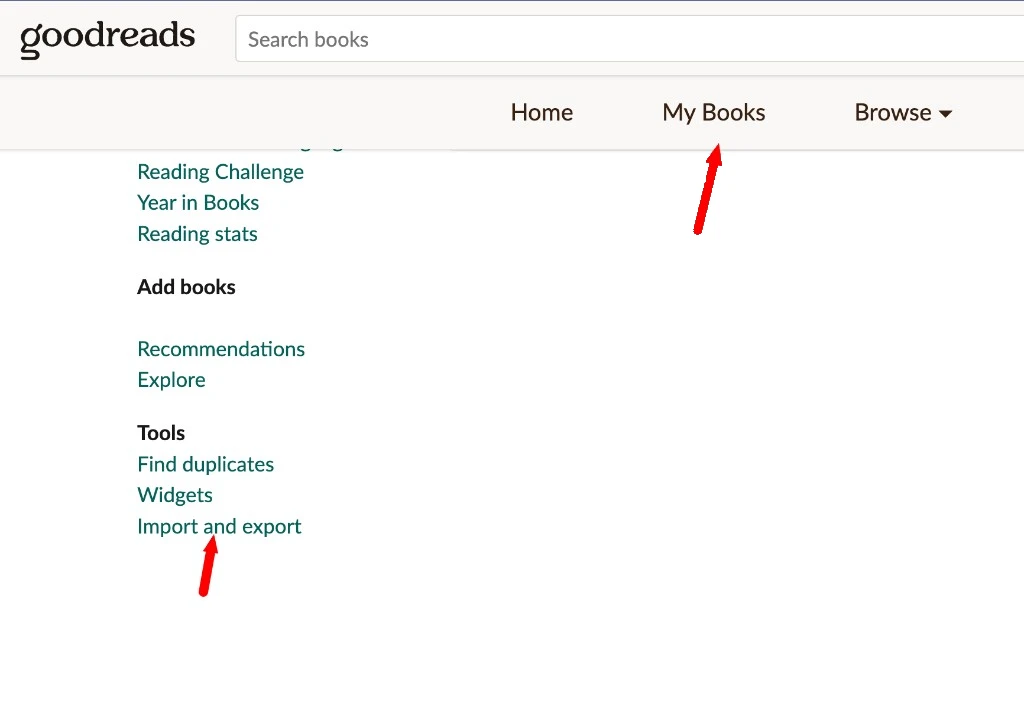
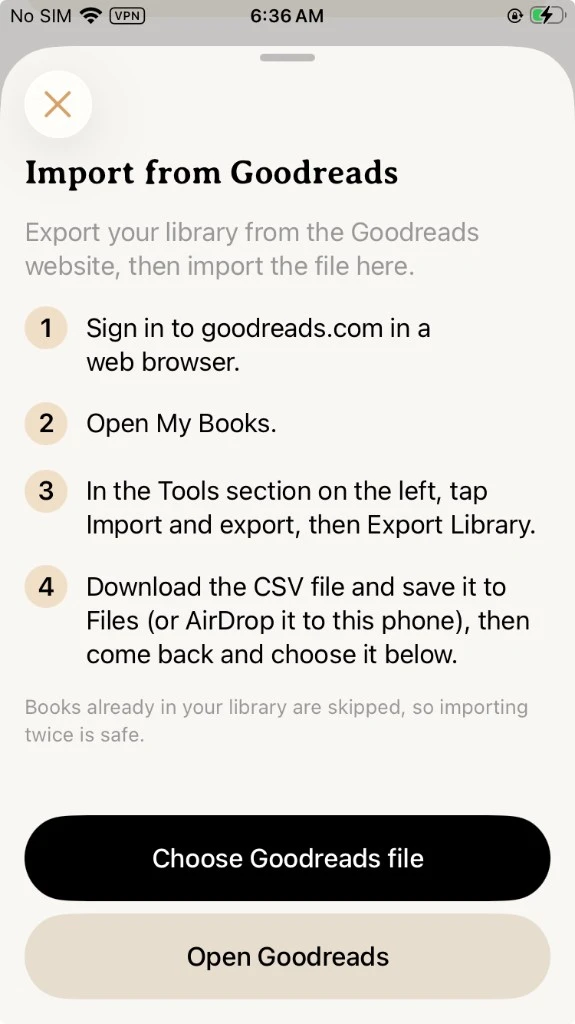
- On goodreads.com, open My Books, then Import and export under Tools. The export is on the website, not in the Goodreads app.
- Click Export Library, then download the CSV when the link appears.
- Save the file to the Files app on your iPhone (or AirDrop it from your Mac).
- In Gleamry, go to Settings, tap Import from Goodreads, and choose the file.
Gleamry shows a preview first: how many books are read, currently reading, or on your want-to-read list. Nothing is saved until you confirm. Your shelves become reading statuses and lists, and your ratings, reviews, and read dates come along.
Importing twice is safe, since books already in your library are skipped. And exporting from Goodreads doesn’t change your Goodreads account, so you can keep it, or delete it later once you’re settled.
How to choose
- You want no account, offline use, and an app you enjoy opening: Gleamry.
- You own hundreds of physical books and lend them out: BookBuddy.
- You love timing reading sessions: Bookly.
- You want a free app and don’t mind ads: Bookmory.
- You trust nothing with your data: a spreadsheet or a notebook.
- You actually want a community: The StoryGraph or Fable, with an account.
Frequently asked questions
Is there a Goodreads alternative that doesn’t require an account?
Yes. Gleamry, BookBuddy, and Bookly on iOS all let you track books without creating an account. Gleamry and BookBuddy store your library on your device.
What is the most private book tracking app?
For an app, look for one that stores your library on your device, needs no account, and has no tracking. Gleamry is local-first, needs no account, and ships no analytics or tracking SDKs. The only option more private is a paper notebook.
Which book tracker works offline?
Gleamry is fully usable offline: adding books by hand, logging sessions, stats, and your shelf all work without a connection. BookBuddy also keeps your library on your device. Searching for new books needs the internet in every app.
Can I move my Goodreads library to an app with no account?
Yes. Export your library as a CSV from the Goodreads website (My Books, then Import and export), then import the file. Gleamry has a built-in Import from Goodreads option in Settings.
What happens to my books if I lose my phone?
With a local-first app, your data is only on your device, so make backups. Gleamry exports a JSON backup and a Goodreads-compatible CSV at any time. Save one to Files or iCloud Drive every so often.
Is The StoryGraph a good Goodreads alternative?
Yes, if you want recommendations and community. It isn’t a no-account option, though: it requires an account and doesn’t offer an offline mode yet.
Is Gleamry free?
Gleamry is a paid app. Current pricing is listed on the App Store.
Is Gleamry on Android?
Not at the moment. Gleamry is built for iPhone first.
Ready to leave the profile behind? Gleamry is a private, offline-friendly book tracker for iPhone, with a bookshelf that looks like yours.